
THE MY SHADOW ONLINE JOURNAL · PROJECT ASSISTANCE
How to Brief a Project Assistant: Scope, Deliverables and a Clear Finish Line
A little clarity at the start. A more confident handover at the end.

A good project brief tells your assistant what needs to be achieved, what they must hand over, when you need it and who can approve the work. It also explains what is outside the assignment. You do not need a lengthy document; you need enough shared understanding for the work to begin without a trail of follow-up messages.
If you have ever delegated “prepare the report” and received something quite different from what you pictured, the missing piece may have been the brief. The assistant saw a task. You had a finished result in mind. This guide helps you connect the two.
When does project assistance make sense?
Project assistance suits work with a defined outcome and a finish line: preparing a reporting pack, coordinating the tasks for a business initiative, or organising documents for a planned handover. Recurring work, such as managing an inbox each weekday, usually needs an ongoing support arrangement instead.
My Shadow Online offers project-based support for agreed deliverables, including project planning and execution support, reporting and presentation preparation, and task coordination. Scope, deadlines and pricing are discussed before the work is assigned. Confirm the particular skills and outputs your project requires through the project assistance service.
If your requirement is ongoing, our first-week virtual assistant handover guide is a better starting point for setting up a working routine.
1. Explain the outcome and the audience
Start with why the project exists. What decision, meeting or business process will the finished work support? Who will use it? An internal working document needs a different level of explanation from a presentation for someone encountering your business for the first time.
Write one sentence that completes this thought: “When this project is finished, we will be able to…” Then add the intended reader and the information they need.
For example: “We need a clear monthly operations pack so the management team can review outstanding actions before its planning meeting.” This is an illustrative brief, not a My Shadow Online client project. It explains the purpose without asking the assistant to guess which business decisions matter.
2. Turn the outcome into specific deliverables
A deliverable is something you can receive and review. List the actual outputs, their formats and their boundaries. “Reporting support” is a category of work. “One consolidated spreadsheet and a five-slide summary using the supplied figures” is a reviewable output.
For each deliverable, specify:
- Content: the sections, records or information to include.
- Format: an editable document, spreadsheet, presentation or PDF.
- Source: the approved files or information to work from.
- Acceptance: what you will check before calling it complete.
The Project Management Institute’s guidance on work breakdown structures describes planning around project deliverables and breaking the work into manageable components. For a smaller assignment, a short deliverables list can apply that principle without creating an elaborate project system.
Add exclusions too. If the assistant is formatting supplied figures, make clear whether interpreting those figures, obtaining missing data or rewriting the narrative is included. A clear boundary makes a quote easier to assess and changes easier to discuss.
3. Provide the inputs that unlock the work
A deadline alone does not make a project ready to start. The assistant may need your template, current files, brand guidance, background notes or access to an agreed workspace. Gather those inputs in one place and identify the current version.
Avoid sending five attachments with names such as “final”, “final new” and “use this one”. Point to one source folder and state which file takes precedence if information conflicts. If your team struggles with this regularly, structured documentation is worth addressing beyond this individual project.
List missing inputs separately, with an owner and an expected date. An assistant should be able to flag a gap without quietly inventing an answer. Where access is needed, agree appropriate permissions and share only what the assignment requires.
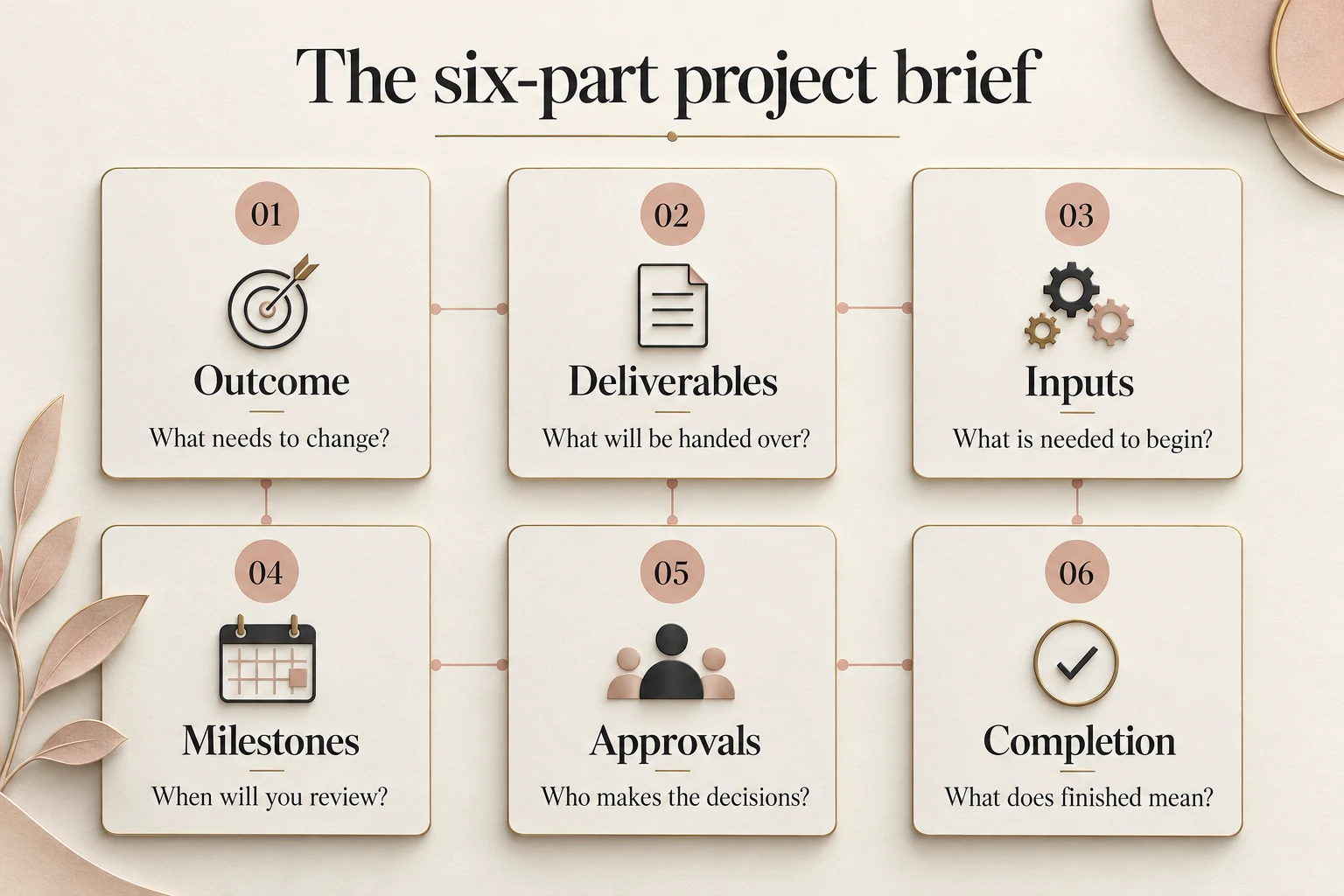
4. Set milestones that leave room for decisions
Separate the date you need the final output from the dates when you must review it. If a presentation is required for a Thursday meeting, receiving the first draft late on Wednesday leaves little room for meaningful changes.
For a straightforward assignment, use three milestones: an outline or sample, a complete draft and the approved handover. The early sample is especially useful for recurring page layouts, spreadsheet structures or slides: you can settle the approach before it is repeated throughout the work.
Agree how quickly you will respond. If the team submits a draft on time but feedback arrives late, the completion date may need to move. Make dependencies visible rather than treating every delay as an execution problem.
For remote work, write the time zone beside the deadline. A Johannesburg business might specify “15:00 SAST, Johannesburg time (UTC+2)”. If colleagues work elsewhere, confirm their local equivalent and the times when someone will be available to answer questions.
5. Give approvals a clear owner
Choose one person to consolidate feedback and approve the result. Other colleagues can contribute, but the assistant should not have to reconcile conflicting instructions from several people.
Decide which choices can be made independently and which require approval. Correcting formatting might be routine; changing a client-facing statement or removing a section may need your decision. Set these boundaries in plain language.
Keep progress updates equally practical: completed work, next steps, missing inputs and decisions needed. A short update that identifies a blocker is more useful than a long account of every activity.
6. Agree what “finished” means
Completion should be based on the agreed outputs, not an assumption that nobody has more requests. State where the files will be saved, which formats you need and who signs off.
For a reporting pack, your acceptance checklist might confirm that the agreed sections are present, the supplied reporting period is used, the formatting follows the approved sample and unresolved information is clearly flagged. The content owner still needs to review the business information and approve its use.
Discuss revisions before accepting the quote. Ask what is included, how feedback should be submitted and how additional requests affect price and timing. Do not assume unlimited changes or that an entirely new deliverable can fit into the original agreement.
A project brief you can copy
Use these prompts in an email or shared document. Short, specific answers are enough to start a useful scoping conversation.
- Purpose and audience: What will the finished work help someone do?
- Deliverables: What exactly should be handed over, and in which formats?
- Included and excluded: Where does the assignment begin and end?
- Inputs: Where are the approved files, and what is still missing?
- Dates: When are the sample, draft, feedback and final handover due?
- Decision owner: Who answers questions and approves the result?
- Completion criteria: What will be checked before sign-off?
- Commercial scope: What does the quote cover, including revisions and changes?
If you cannot answer a prompt, mark it “to agree”. That is more useful than hiding an uncertainty inside a confident-sounding deadline.
Project assistance: common questions
How detailed should my project brief be?
Detailed enough to define the output, boundaries, inputs and approval process. A simple assignment may fit on one page. Add supporting examples or requirements when complexity warrants them, rather than making the brief long for its own sake.
Can I ask for support if the scope is still unclear?
Yes. Start by describing the problem, your intended outcome and any known deadline. My Shadow Online discusses project scope and objectives before quoting. Confirm which planning or clarification activities would form part of the proposed service.
What if the project changes halfway through?
Record the new request and agree its effect on deliverables, cost and timing before work proceeds. Sometimes the right answer is to replace an earlier requirement; sometimes it is a separate piece of work.
Can project assistance work across different countries?
My Shadow Online provides remote support. For your particular project, agree communication channels, working-hour overlap, file access and time-zone-specific deadlines during scoping.
Bring a clearer brief to your next project
You do not need every detail resolved before asking for help. Start with the outcome, the files you already have and the date that matters. Those three things make the conversation concrete.
To discuss project assistance, email info@myshadowonline.com or request a custom quote from My Shadow Online. Outline the deliverables you have in mind and ask the team to confirm scope, availability and the handover arrangements.