
MY SHADOW ONLINE JOURNAL · VIRTUAL ASSISTANCE
How to Onboard a Virtual Assistant: Your First-Week Handover Plan
A clear brief. A manageable trial. A calmer way to begin.

The best way to onboard a virtual assistant is to start with one clearly defined recurring task, provide a good example, agree what needs your approval and review a small trial before expanding the workload. You do not need to document your entire business before getting help. You do need to make the first assignment understandable.
That distinction matters when you are already busy. It is easy to postpone support because explaining the work feels like another job. But the useful knowledge is often already there: an email you handled well, a report you produce every Friday, or a checklist you run through in your head.
This guide shows how to turn that knowledge into a practical first-week handover. It is a suggested framework for small business owners, solopreneurs and busy teams, rather than a promised onboarding timetable. Adapt it to your agreed hours, task complexity and availability.
Before day one: choose a useful first assignment
“Help me with admin” describes a need, but it does not tell someone what to do next. A stronger assignment names the input, the action and the finished result.
For example: “Use the approved meeting notes to update our action tracker. Add the owner and due date where these are stated, flag anything missing and send the updated file for review.” The assistant can now recognise both the task and its limits.
Choose work that is frequent enough to practise and contained enough to check. Avoid starting with a task whose rules change every time, unless you can be available to explain those decisions.
If you are still deciding which type of help fits your workload, review My Shadow Online’s virtual assistant and administrative support services. Flexible daily support and a defined project may need different arrangements; confirm the scope in your consultation.
Day one: agree priorities and define “done”
Begin with the result you want, rather than a tour of every tool you use. Explain why the task matters, who uses the output and what would make the work ready for approval.
For a weekly report, “done” might mean the agreed reporting period is correct, the source figures are included, missing information is flagged and the document is saved in the right folder. Sending it to a client would be a separate action requiring permission.
Agree which task takes priority if there is more work than the available hours can cover. Otherwise, an assistant may complete several easy items while a more important deadline approaches.
Write a short task brief
Keep the first brief simple enough to use while working:
- Outcome: What should be ready at the end?
- Inputs: Which files, messages or records should be used?
- Method: What are the essential steps?
- Standard: What example shows an acceptable result?
- Deadline: When is it needed, and in which time zone?
- Approval: What can be completed independently, and what must wait?
- Questions: Where should uncertainties or missing inputs be recorded?
A few precise lines are more useful than pages of background with no clear instruction.
Day two: show the work, including the awkward parts
Walk through a typical example and explain the decisions you usually make without thinking. If you always check a customer’s previous message before drafting a reply, say so. If a missing date means the record must be flagged rather than guessed, include that rule.
Use a written checklist, an annotated example or an agreed screen walkthrough. Keep reference material in one location so instructions do not become scattered across chat, email and several document versions.
Then discuss an exception. What happens when two source documents disagree? Who decides if a request falls outside the normal process? An assistant does not need every possible answer on day two, but they need a clear route for asking.
For related background, the existing article on structured documentation in growing businesses explores why repeatable information matters. For this handover, focus on the smallest useful procedure you can actually maintain.
Day three: set access and decision boundaries
Provide access only to the information and tools required for the agreed task. Where your systems support it, use individual accounts or delegated permissions so you can review and remove access when responsibilities change.
Keep passwords out of the handover document. Use your organisation’s approved access-sharing method and enable multi-factor authentication where available. The UK National Cyber Security Centre’s guidance on securing users’ accounts provides useful background on account protection.
Access and authority are separate questions. Being able to open a customer record does not automatically mean an assistant may change its terms or send a message on your behalf.
For international working arrangements, agree both the deadline and the working overlap. “Friday morning” is ambiguous across countries. “Friday, 10:00 Johannesburg time” is clearer. Confirm actual support hours and expected response windows; remote support does not automatically mean round-the-clock availability.
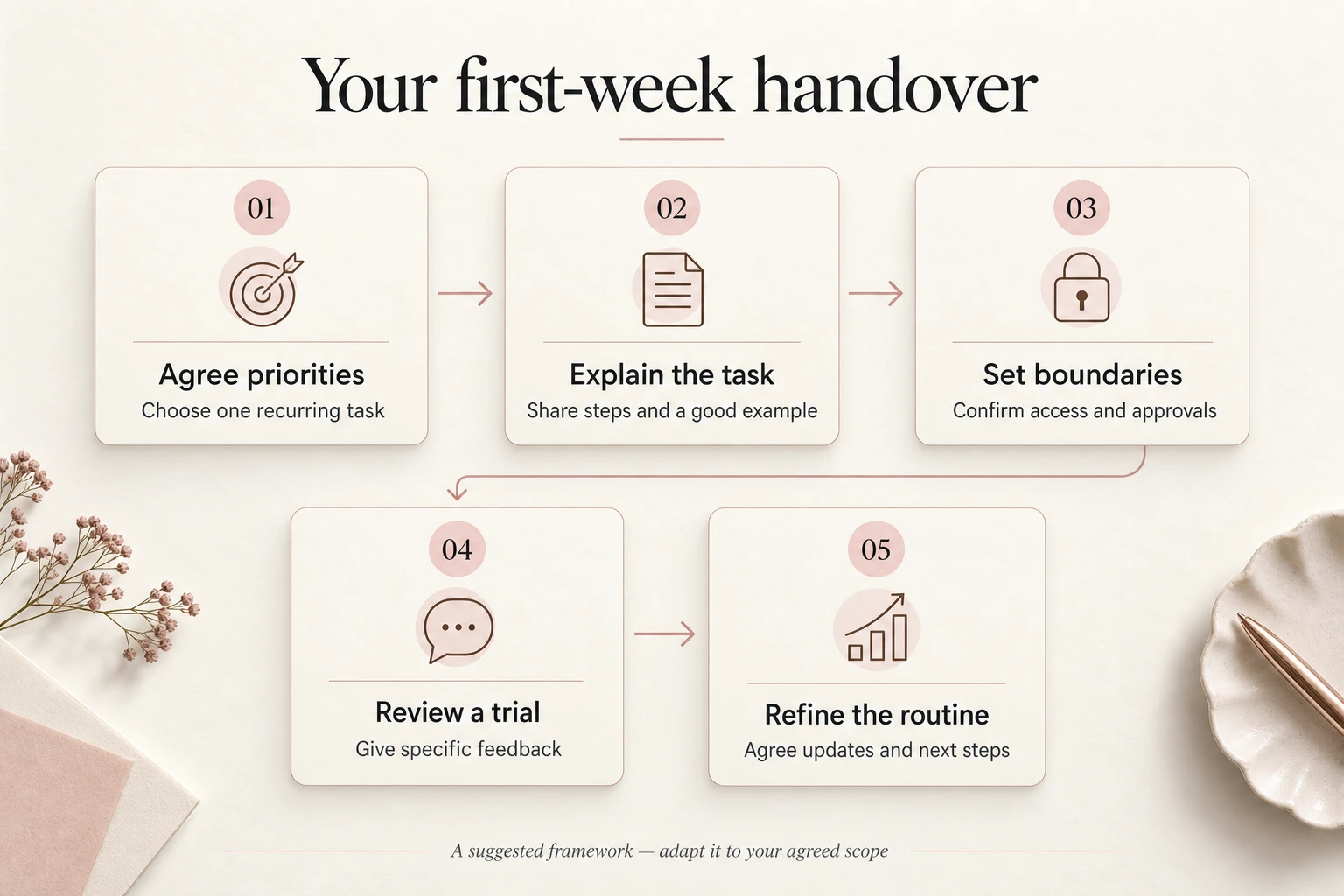
Day four: review a small trial together
Ask for a small sample before assigning the full queue. This gives you a manageable result to review and lets the assistant test whether the instructions are complete.
Check against the brief. Is the information accurate? Is the output in the correct format? Were missing details flagged? Did the assistant stop at the agreed approval point?
Make feedback specific. “This is not quite right” leaves the next attempt uncertain. “Use the dates from the meeting notes, and leave the deadline blank when no date was agreed” creates a reusable rule.
Update the instruction once the decision is clear. Otherwise, the most useful guidance remains buried in a conversation, ready to be missed next week.
An illustrative handover
Imagine a consultant who wants help maintaining a weekly action tracker. The first sample contains five actions. Three are complete, one lacks an owner and another has conflicting deadlines in two source documents.
A useful trial identifies those gaps rather than inventing answers. The consultant confirms the missing details, the assistant updates the tracker and the procedure gains a rule for conflicting dates. This is an illustrative example, not a My Shadow Online client case study.
Day five: agree the routine before adding more work
Review what was easy, what needed clarification and what caused delay. Then agree the next repeat of the same task. Familiar work gives both sides a better basis for judging the handover than immediately introducing several unrelated assignments.
A concise progress update can cover four things: completed work, work awaiting review, blockers and the next priority. Agree when updates are useful rather than expecting constant messages throughout the day.
Look at quality and effort together. A task completed quickly but requiring extensive correction is not yet ready to scale. Equally, a slower first attempt may reveal an unclear instruction that can now be fixed. Judge the working arrangement on observed results, not a promised number of hours saved.
✦ A FEW USEFUL ANSWERS
Frequently asked questions
Do I need formal procedures before hiring a virtual assistant?
No. Start with a short brief and one good example. Write down the essential steps and approval rules, then improve the instructions as questions arise. Complex or sensitive work may require more preparation.
What if I only need a few hours of support?
Keep the initial scope narrow. Agree which recurring task comes first, how progress is reported and what happens when the available hours are used. Ask My Shadow Online to confirm an arrangement suited to your workload.
Should my assistant reply to clients immediately?
Only if that responsibility has been agreed. A draft-for-review stage can help establish tone, accuracy and escalation rules before independent sending is considered.
Can this plan work across time zones?
Yes, provided deadlines, access, working hours and approval windows are explicit. Allow time for questions when you are not online together, and agree how genuinely urgent items will be handled.
Start with a handover you can manage
You do not have to solve every operational problem before asking for support. Bring one recurring task, an example of the result you want and a clear account of where you currently get stuck.
My Shadow Online provides remote support for businesses worldwide. Its account-manager approach gives you a point of contact to discuss priorities and coordinate the agreed work. Ask about suitable support, responsibilities and onboarding steps for your situation.
Email info@myshadowonline.com or request a consultation and custom quote. Include your first task, its frequency, the tools involved and your preferred working hours so the conversation starts with something concrete.